Audit a Cisco config in seconds — line by line.
Open a show running-config from any Cisco router, switch or firewall. ConfGoOne flags every insecure setting, points to the exact line, explains the real risk, and hands you the IOS commands that fix it.
What ConfGoOne checks
A sample of the real checks in ConfGoOne's rule packs — each one reported with the evidence from your file and the fix.
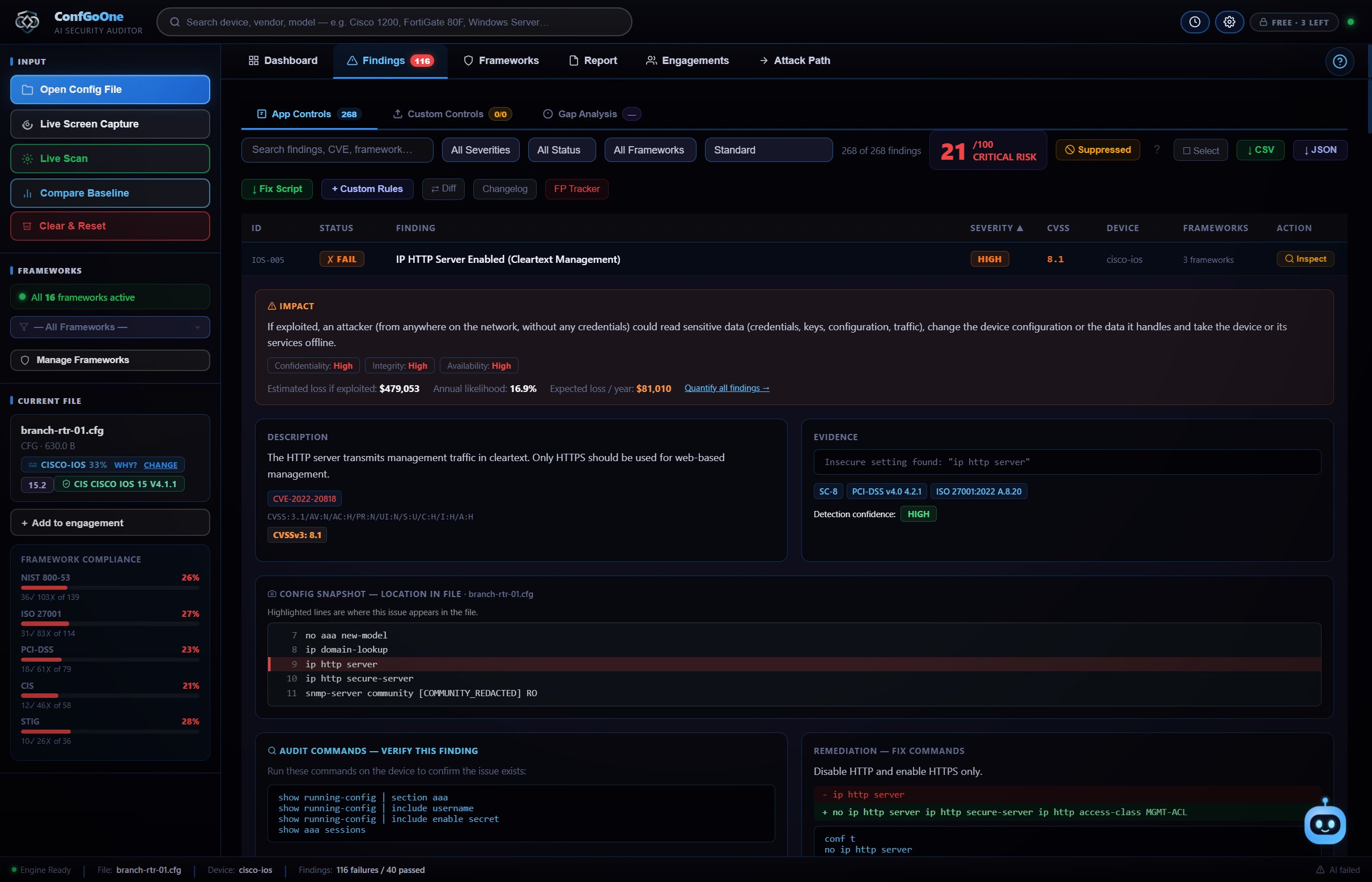
The exact line, not a vague warning
Each finding shows a snapshot of your config with the problem line highlighted — no hunting through 2,000 lines of running-config.
Fix commands you can paste
Remediation is written in IOS syntax (no ip http server, transport input ssh…), plus one Fix Script for everything.
Version-aware vulnerability checks
ConfGoOne reads the IOS version and lists known CVEs for it, including those on CISA's actively-exploited list.
How it works
No setup, no agent, no "start scan" button.
A configuration file, a live connection or a screen capture — whichever you can get.
The device type is recognised and every setting is checked the moment the file opens.
Work through the findings with their fix commands, then export HTML, PDF, Word or a STIG checklist.
Questions
How do I audit a Cisco router configuration?
Export the running configuration (show running-config) to a text file and open it in ConfGoOne. The audit starts immediately — there is no setup — and you get every finding with the line it came from and the commands to fix it.
Does it support Cisco ASA and Firepower?
Yes. ConfGoOne has separate rule packs for IOS / IOS XE, NX-OS, ASA, Firepower Threat Defense, Catalyst SD-WAN and Meraki, and detects which one you opened automatically.
Which standards are the Cisco findings mapped to?
Findings are mapped to CIS Benchmarks, DISA STIG, NIST SP 800-53, ISO/IEC 27001, PCI-DSS and more. You can also audit against a single standard — for example only CIS.
Is my Cisco config uploaded anywhere?
No. The audit runs on your own PC. Passwords and keys are never sent anywhere; the optional AI review only receives a redacted copy.
Related
Run your first audit in the next minute.
Three free audits. No credit card, no cloud upload — your configs never leave your PC.
Download ConfGoOne →